
Extension Source Viewer & Security Analyzer · Understand extensions before you trust them
Submitted May 18, 2026, 6:11 PM
Details
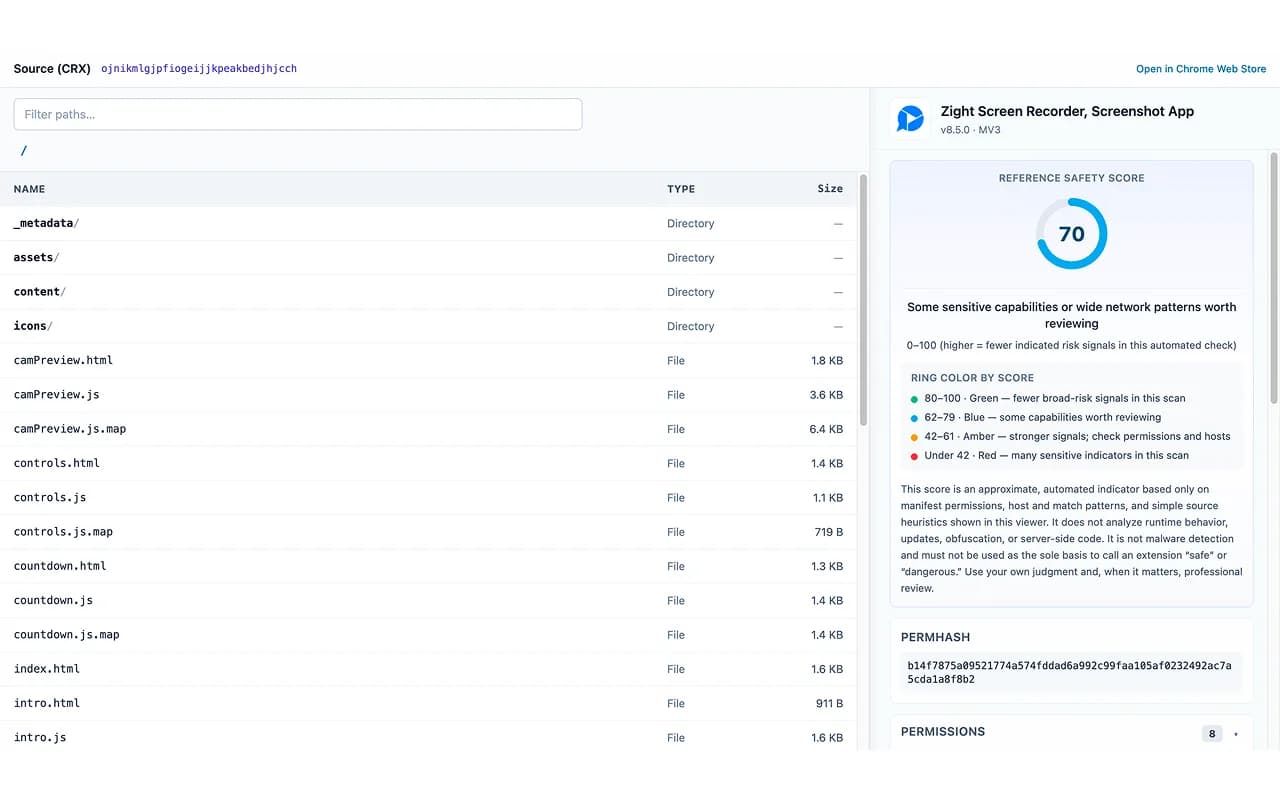
Inspect source code and evaluate the safety of Chrome extensions — quickly, clearly, and with actionable insights.
🚀 Key Features
🔹 View extension source code (CRX) instantly
Browse files like manifest, background.js, and content scripts directly in your browser — no downloads required.
🔹 Automated safety analysis
Get a Safety Score (0–100) based on:
Permissions
Host & match patterns
Heuristic signals from source code
🔹 Understand risks at a glance
Not just raw technical data — this tool helps you:
Identify sensitive permissions
Detect extensions running on many websites
Spot potential security concerns quickly
🔹 Detailed breakdown by category
Permissions
Network / host access
Rule-based security scan
Links & URLs found in source
🔹 Clean, easy-to-read interface
Designed for both developers and everyday users to quickly assess extension safety.
💡 Who is this for?
✔️ Users who want to verify extensions before installing
✔️ Developers performing quick audits
✔️ Security researchers analyzing extension behavior
🔒 Privacy & Security
No personal data is collected
No external requests are made
All analysis runs locally in your browser
⚠️ Disclaimer
The Safety Score is an automated indicator, not a definitive judgment.
This tool helps you make informed decisions, but does not replace professional security review.
⚙️ How to use
Open an extension’s detail page on the Chrome Web Store
Click the extension icon in your browser toolbar
The source viewer and safety analysis panel will open instantly
🧠 Understand extensions before you trust them.
Comments (0)
No comments yet. Be the first to share feedback.